The full platform

One platform for
how your agency works.

Every lead, university email, deadline, offer and commission is tracked and chased for you. Stop losing students, fees and revenue to the things nobody noticed in time.

Sound familiar?

Agencies don’t lose students to competitors.
They lose them to things nobody noticed.

A reply that came too late. A form nobody chased. An invoice nobody sent. Each one feels small on the day, and each one costs you a student, a fee or a commission.

The fix

Your CRM chases it, so your team doesn’t have to remember.

Every slip above has a rule here. Set it up once in the workflow builder and it runs on every lead and application, every day, whoever is on leave.

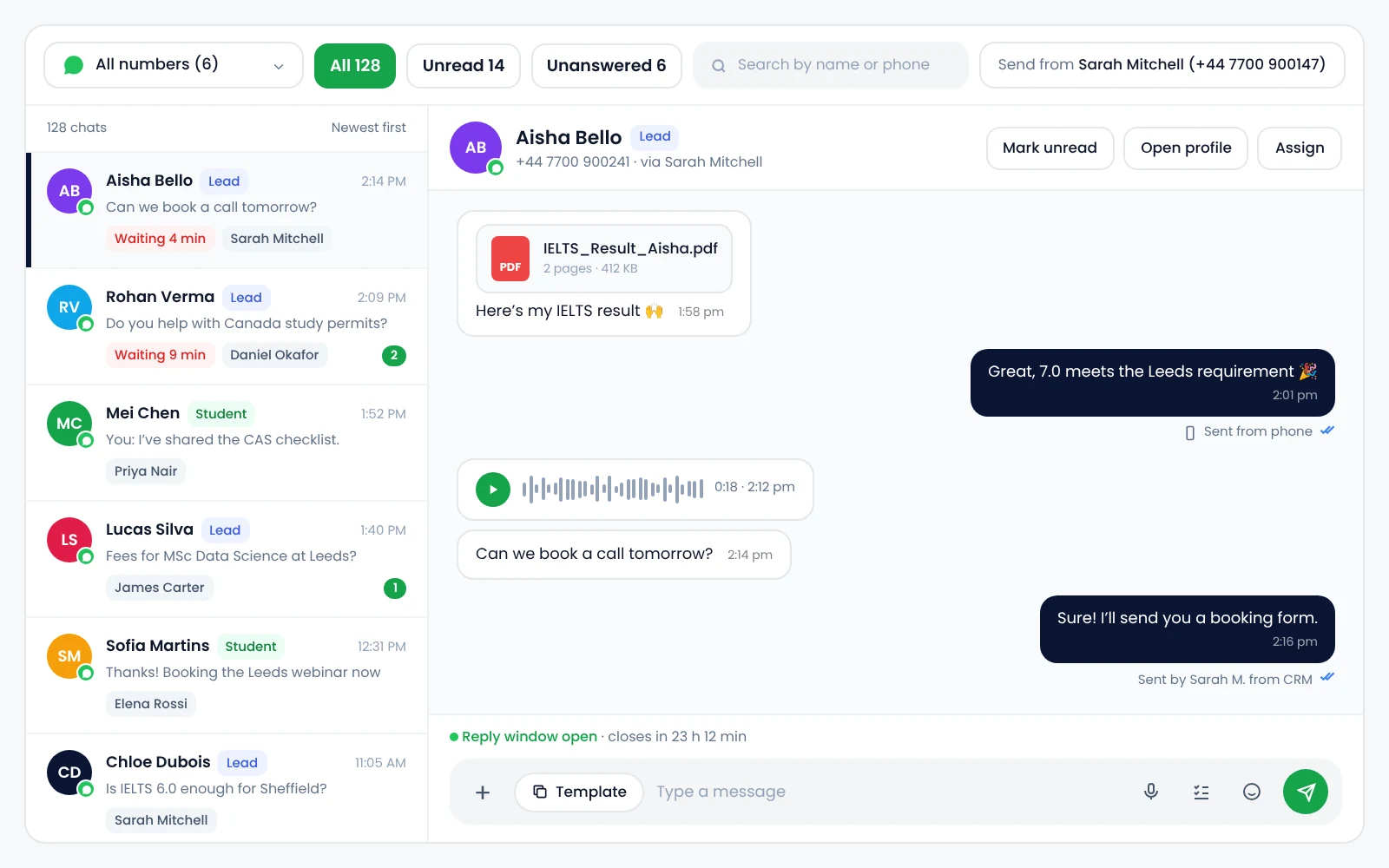
WhatsApp

“A student is still waiting for a WhatsApp reply.”

WhenWhatsApp chat unanswered
Checked every minute, on every number
Alert the counsellor who owns the chat
Escalate to the manager if still waiting
Cold leads

“Nobody has touched this lead for a week.”

WhenLead not touched for N days
You choose the number of days
Remind the counsellor, or reassign the lead
Send the student a WhatsApp or email follow-up
Lead redirect

“Right student, wrong desk. So it sits.”

WhenLead Redirected
Counsellor marks it for another destination
It restarts with the new destination
Routed to that desk, or an alert if nobody picks it up
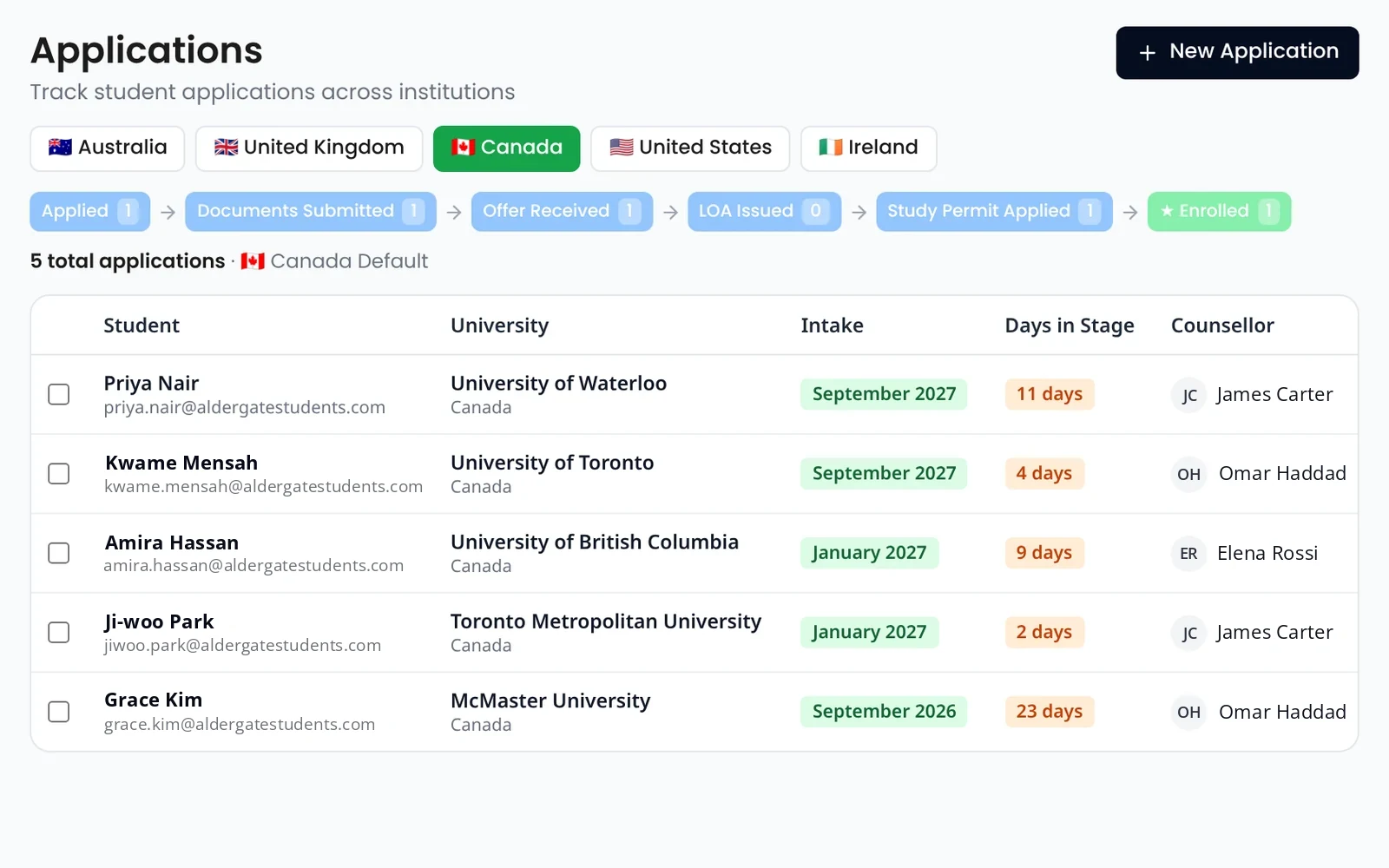
Stuck application

“Forwarded three days ago, still not submitted.”

WhenApplication in same stage for N days
You choose the stage and the number of days
Alert the admissions officer
Escalate to the manager
Deadlines

“Today is the deadline and applications are still open.”

WhenReminder overdue
Reminders set on each application
The moment one is overdue, the workflow starts
Alert the officer and the manager
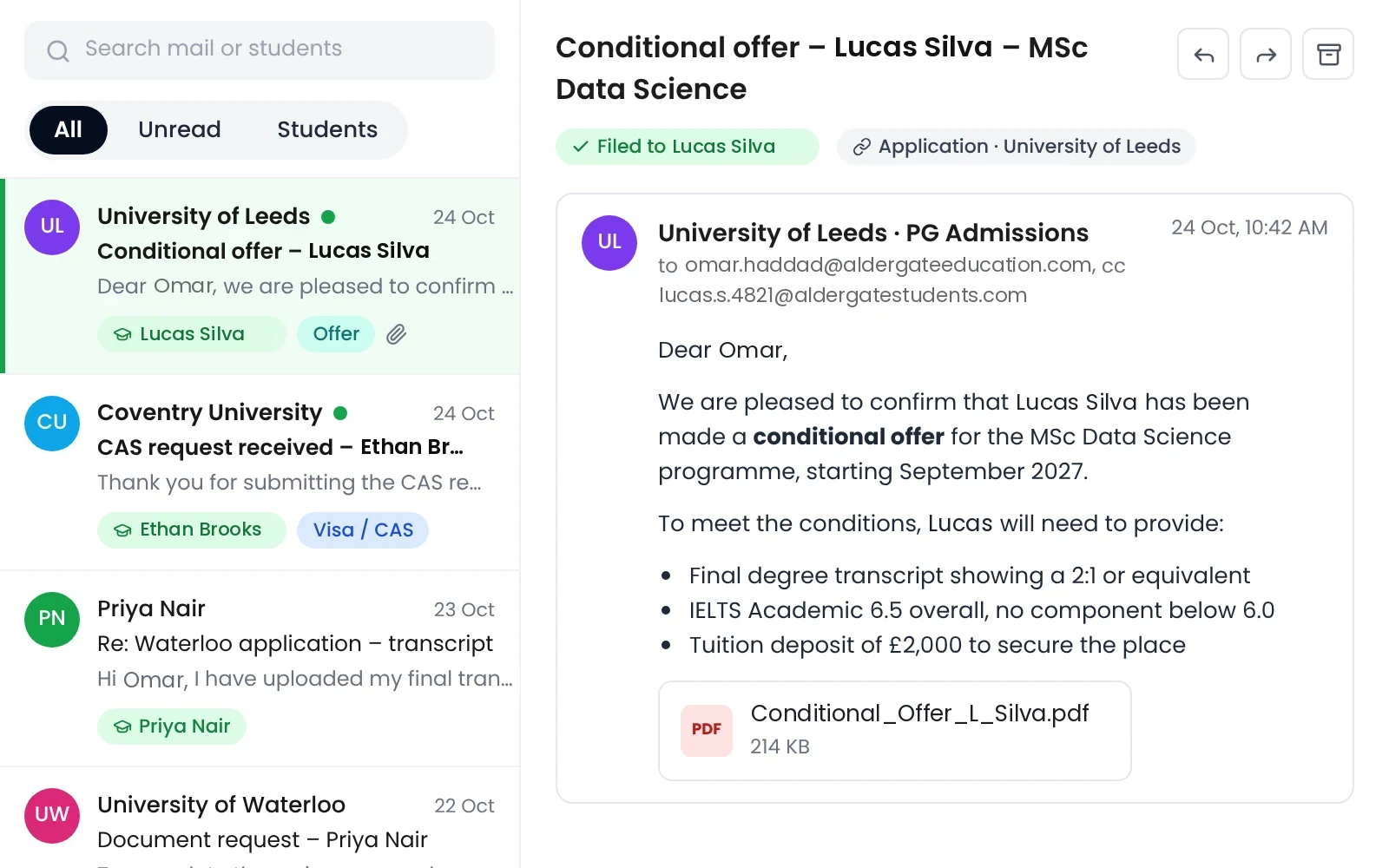
University email

“A document request sits unanswered in someone’s inbox.”

WhenUniversity email not answered
Filed on the application for the whole team
Alert the admissions officer
Escalate to the manager if still open
Turnaround

“No offer, and nobody asked the university why.”

WhenApplication submitted
Wait for the university’s turnaround time
If there’s no offer, set a follow-up reminder
Notify the counsellor
Tuition fee

“Unconditional offer, and the fee was never chased.”

WhenUnconditional offer received
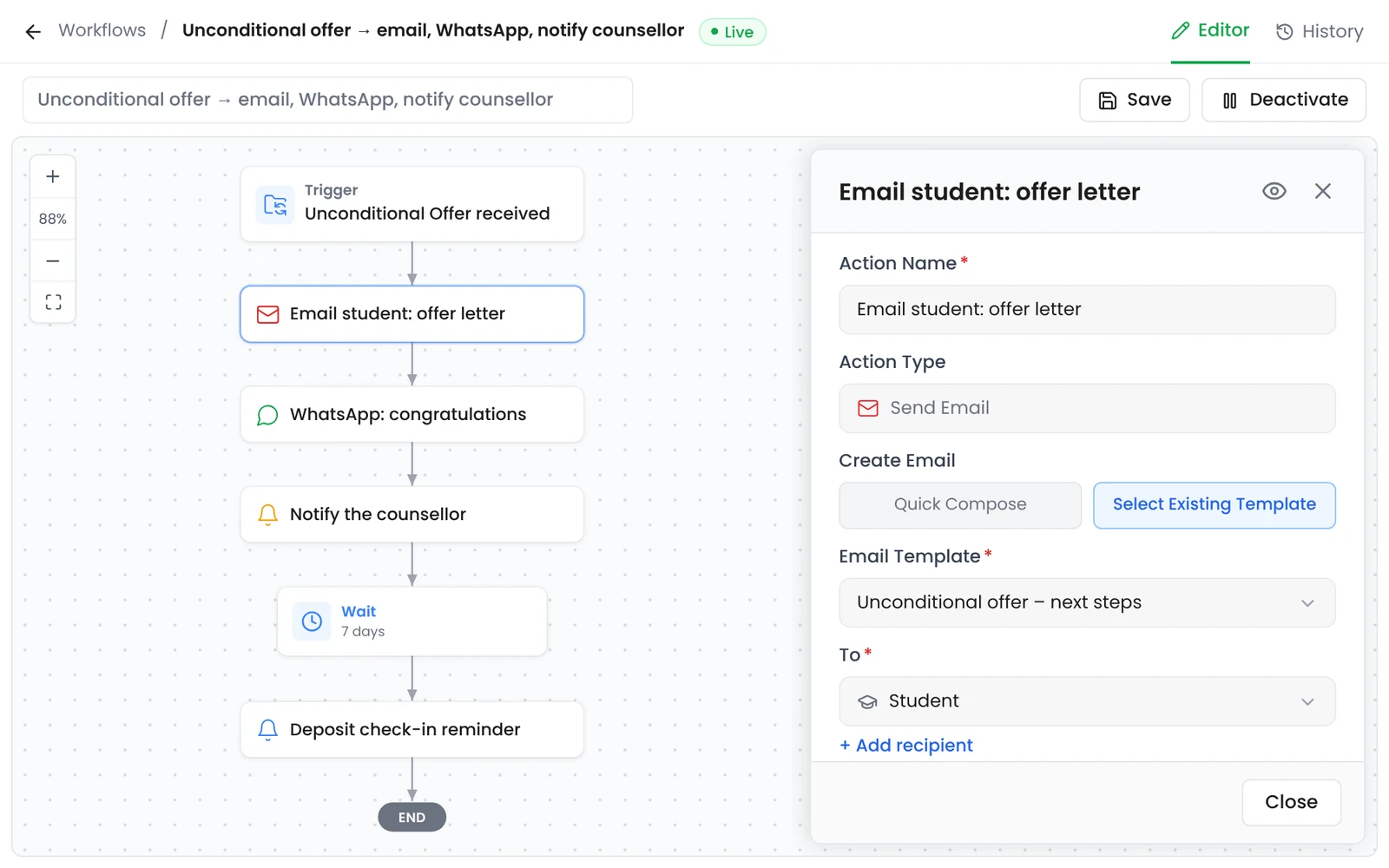
Send the fee details by email and WhatsApp
Wait 7 days
If unpaid, nudge the student and alert the counsellor
Visa request

“Additional documents requested, and the clock is ticking.”

WhenVisa status changed
Create a task for the visa officer
Remind the student on WhatsApp
Escalate if not done in time
New: Update field

Workflows that keep your data right, not just send messages.

A workflow step can now update the lead, student or application itself: English test scores, intake, study level, budget, branch, source, campus and your own custom fields. A WhatsApp form answer, a stage change or a date can fill in the record, so nobody has to retype it.

Intake month and yearEnglish test scoresStudy levelBudgetBranchLead sourceCampusYour custom fields
New leads

A lead is never left waiting.

Assigned instantly by round-robin, welcomed automatically on WhatsApp or email, with waiting timers and an Unanswered filter so managers see every lead that’s gone cold.

See lead management →
Disputes

When a student disputes a deadline, you have the record.

The audit trail and activity log show who did what, and when, on every application and payment.

See the audit trail →

See the workflow builder →

The Setup Assistant

The hardest part of a new CRM is setting it up.
Ours sets itself up.

Most agencies don’t stay on spreadsheets because they love them. They stay because moving to a new system means weeks of setup, consultants and training, while the team still has students to look after. So we took that pain away. You describe your agency in plain English, and your CRM builds itself.

The usual way

Months of setup before the CRM does anything for you.

  • Weeks of calls with an implementation consultant
  • Spreadsheets of stages, fees and roles to fill in and send back
  • Paying for setup and training on top of the licence
  • Your best people pulled off students to configure software
  • A half-built system nobody trusts, so the team drifts back to WhatsApp and Excel

With your Setup Assistant

Tell it what you need. Watch it build.

  • Describe your agency in plain English, like briefing a new colleague
  • It asks the right questions before it builds anything
  • Pipelines, fees, workflows, templates and roles built for you
  • Every change shown to you as it happens
  • Your team starts working in the CRM while it’s still being set up

You type a sentence. It does the setup.

Every request below is a job that normally means a manual, a training call or a consultant. Here it’s one message.

“Create a Canada study permit pipeline with the usual stages.”

Pipeline and stages created

“Add IELTS coaching at $250, and counselling at $500 for the UK.”

Services and fees added per destination

“When an offer arrives, email the student and remind them about the deposit after 7 days.”

Workflow built, ready for you to switch on

“Set up our email on our own domain. We use GoDaddy.”

Step-by-step DNS help for your provider

“Add a Branch Manager role and invite our Dubai team.”

Roles, teams and users set up
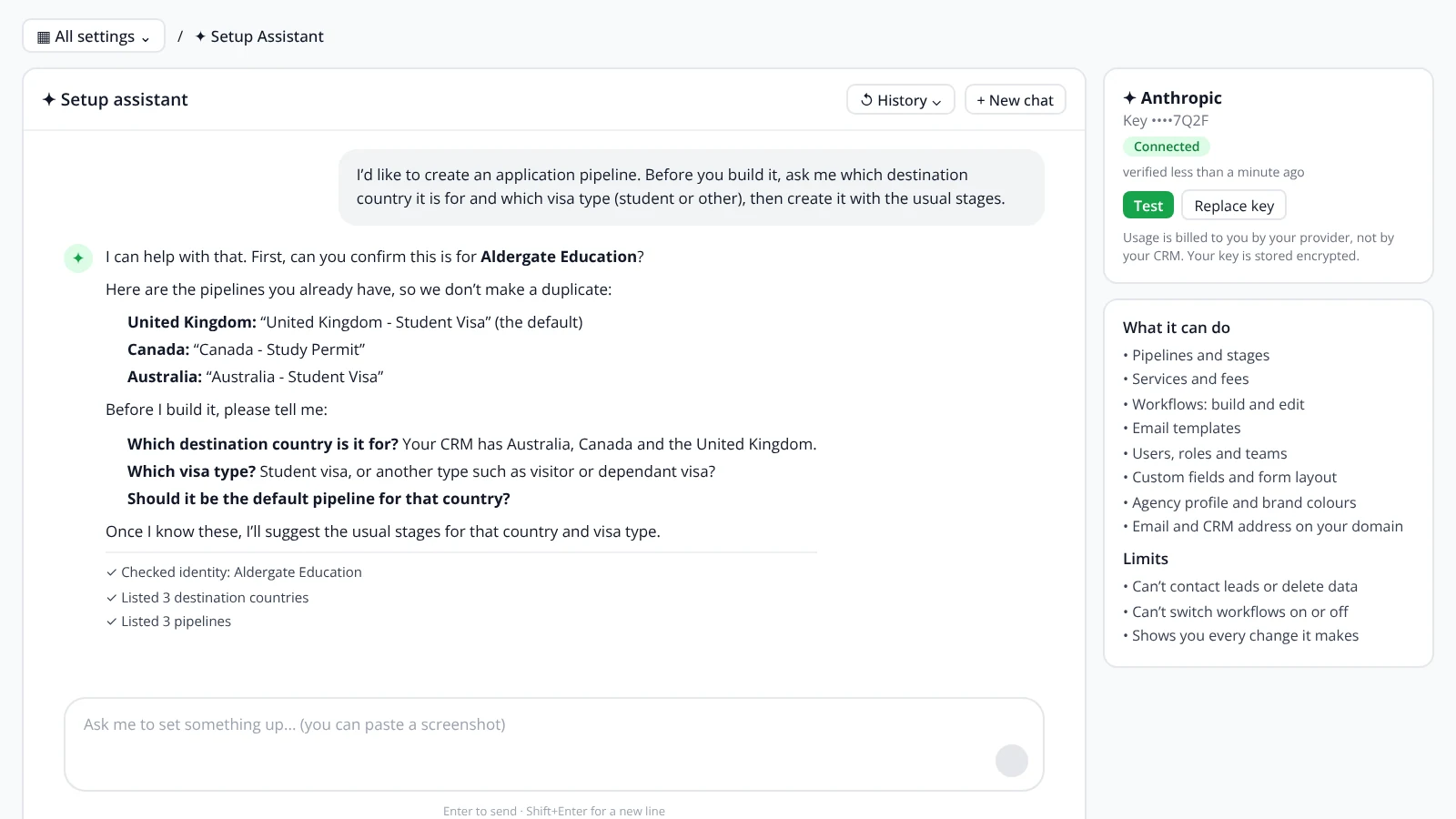
Setup Assistant: asked to create an application pipeline, it lists the agency's existing pipelines and asks which country and visa type before building

Shows every change

You see exactly what it created or edited, as it happens.

Workflows stay off

It builds automations, but only you can switch them on.

Never touches students

It can’t contact leads or delete data.

Admins only

Only agency admins can use it, on your own AI key.

And once you’re running: My Assistant

Ask your CRM anything, in plain English.

“How are my leads doing?” “Show my application pipeline.” Staff get the answer in seconds. It only reads, and only shows what each person is allowed to see.
How are my leads doing?Show my application pipelineNew leads this monthFind a lead

“Every SOP takes a counsellor hours, and generic ones get the student refused.”

SOP Writer

An SOP written about this student, for this course.

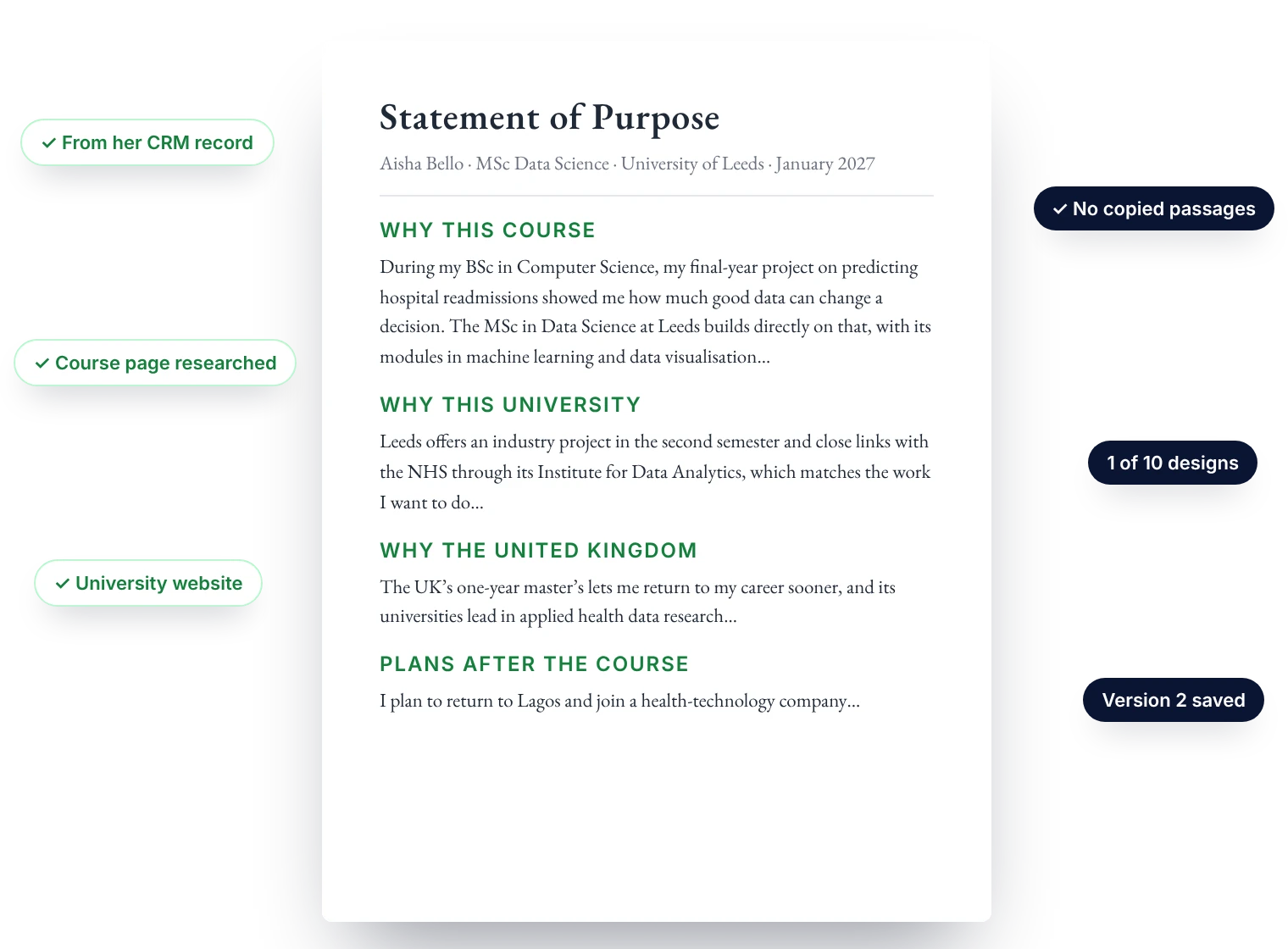
The SOP Writer reads the student’s record in your CRM, researches the course page and the university’s website, and writes the answers every admissions officer and visa officer looks for. Each one is tied to that student’s own background and plans, not a template.

From the student’s CRM record

  • Education and grades
  • English test scores
  • Home country and city
  • Chosen course, university and intake
  • Your custom fields and counsellor’s notes

Researched for you

  • The course page: modules and outcomes
  • The university website
  • What makes this university different

The SOP answers

Why this courseWhy this universityCourse relevanceWhy this countryWhy not other study destinationsWhy not home countryBenefits of the coursePlans after the courseTies to home country

Your counsellor ticks the points this SOP should cover. Each one is written around that student.

✓ Checked for copied passages

Flagged lines are highlighted. Rephrase one, or all of them, in a click.

✓ Your counsellor stays in charge

Edit anything before saving. Every version is kept.

✓ Saved to the student’s documents

As a finished document in one of 10 designs.

Explore the platform

Every module, one CRM.

Pick a module to see what it does for your agency.

Our process lives in two people’s heads.

Your processes, running themselves.

Every stage change can fire a workflow, so nobody has to remember the next step.

  • Offer received → offer letter, WhatsApp and fee details
  • Winning stage → commission invoice drafted
  • Round-robin assignment, equal or weighted
See workflows
Unconditional offer workflow: email the offer letter, WhatsApp congratulations, notify the counsellor, wait 7 days, deposit reminder

“Students message our counsellors all day: what’s happening with my application?”

Three Apps. One Platform.

Every stakeholder gets their own experience.

Each app shows the right data to the right person — nothing more, nothing less.

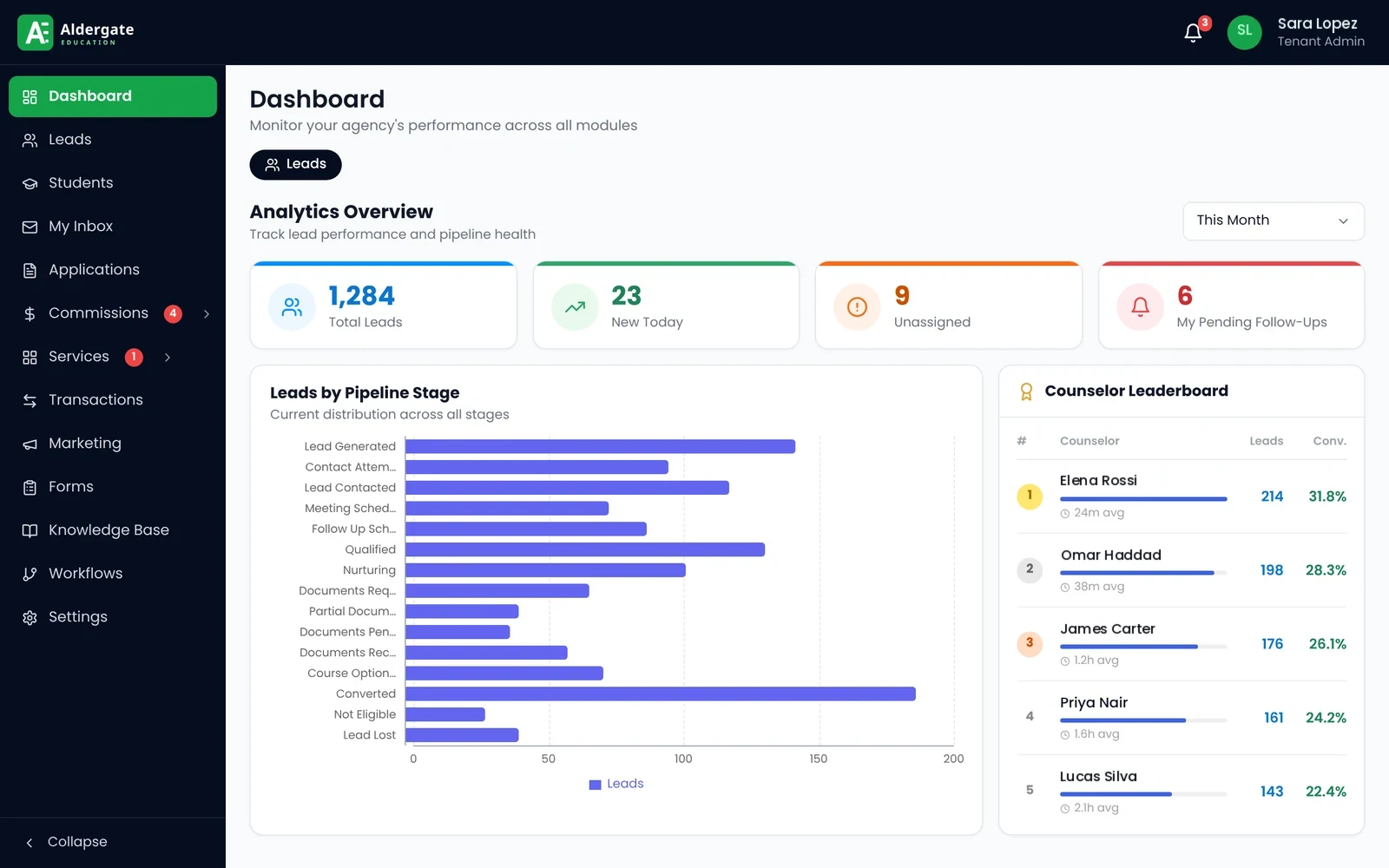
Staff App

Your counsellors, supercharged.

Handle a bigger caseload without the chaos. Every lead, task, and conversation in one mobile web app — branded to you, works in any phone browser.

  • Lead & pipeline management
  • Email, WhatsApp and social messages in one inbox inside the CRM
  • Application stage advancement
  • Task reminders & daily briefing

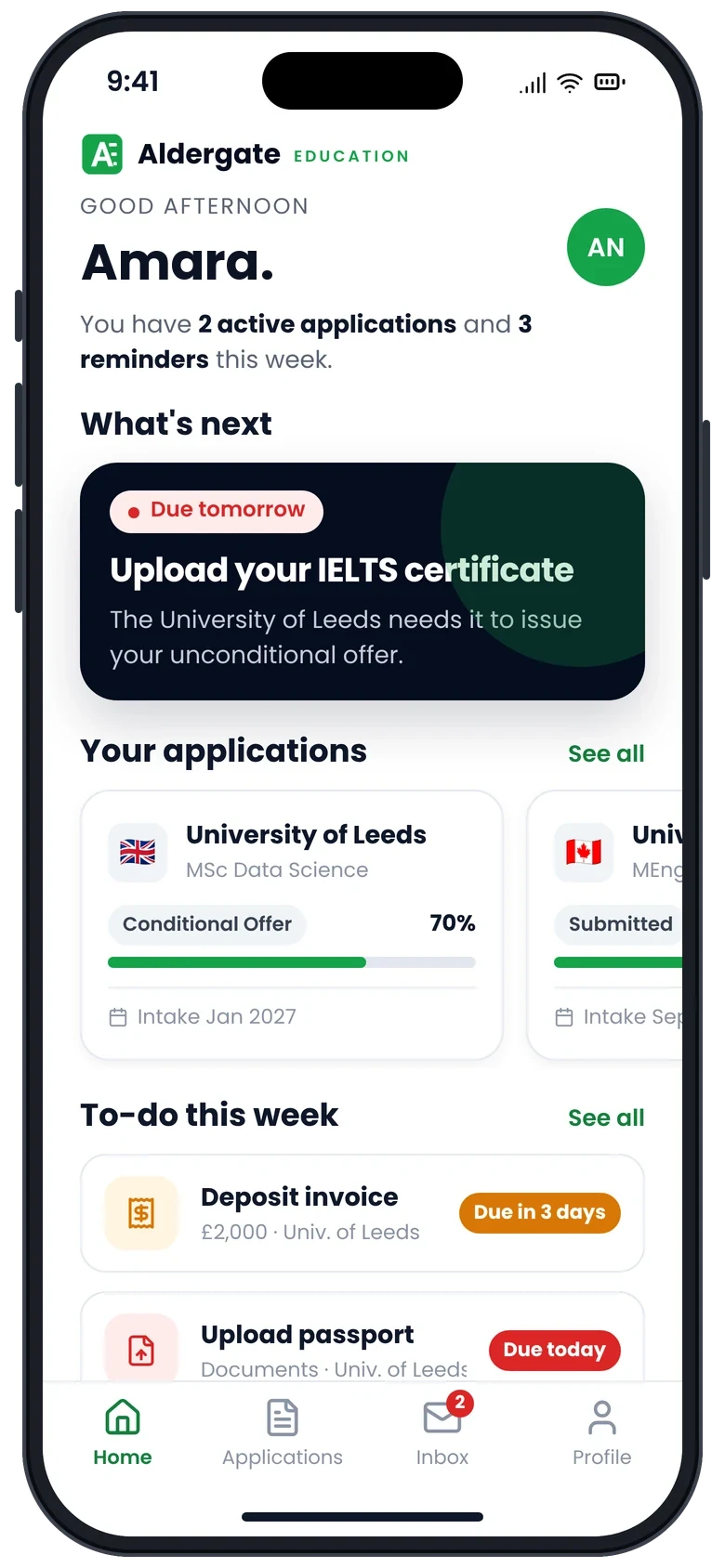
Student App

YOUR BRAND

Students in the loop — always.

Fewer "what's happening with my application?" messages. Students track applications, upload documents and see their invoices in an app that looks like it's yours.

  • Real-time application tracking
  • Document upload & management
  • Invoices and payment history
  • Direct chat with counsellors
See the Student App tour

Partner logins

Partners, through a custom role.

Give partner agencies their own login through a custom role. Choose exactly what they can see and do. You keep ownership of the data.

  • Custom role, not a separate portal
  • You choose exactly what they can see and do
  • Each login counts as a user
  • You keep ownership of the data

“A few students were never claimed, and by the time we noticed, the revenue was gone.”

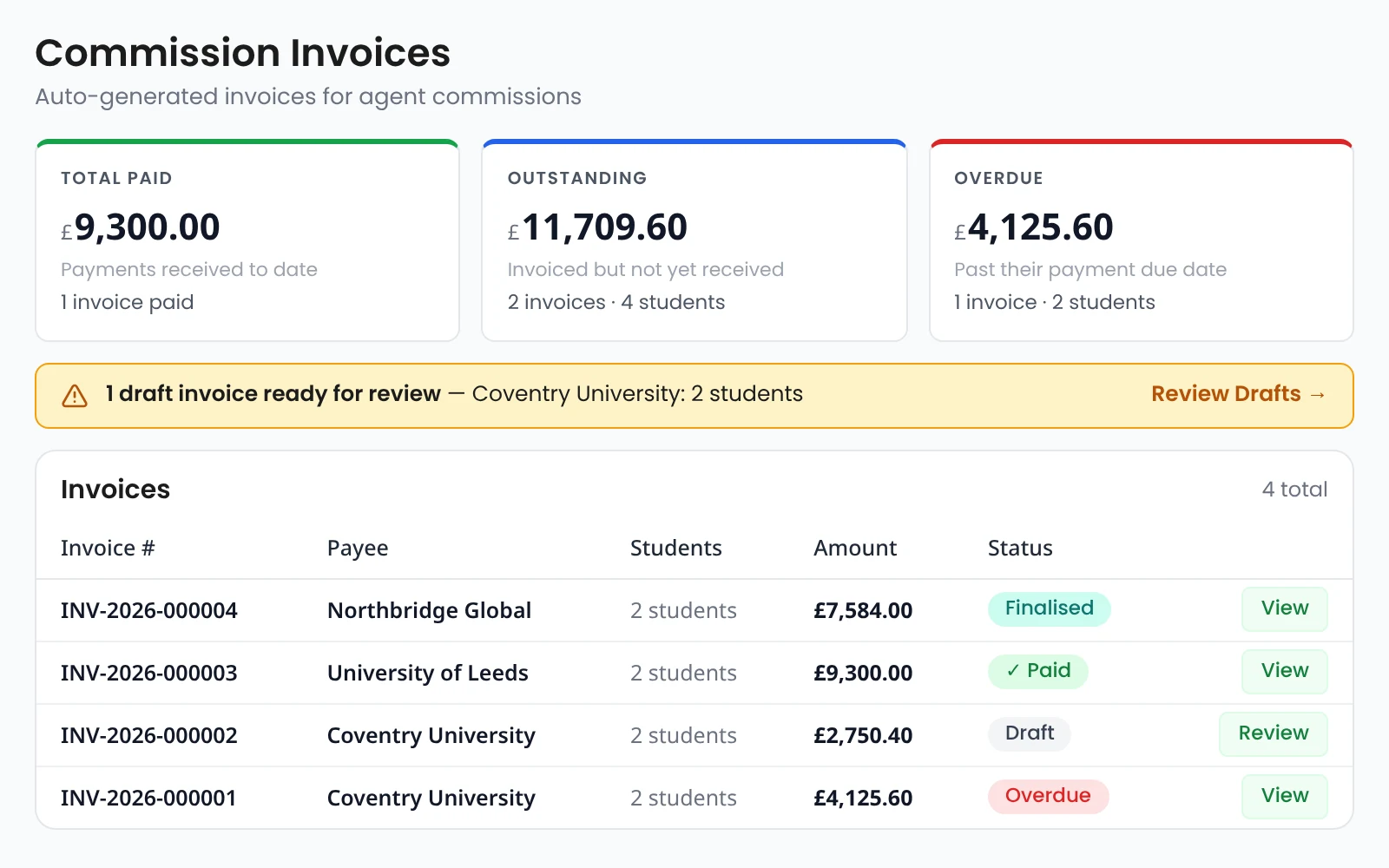
Commission Engine

Commissions that calculate themselves.

Set your rates once — per university, per slab, per intake period. When a student enrols, the commission calculates automatically. Invoices are drafted. Payments tracked. Disputes logged. No spreadsheets. No surprises.

  • Slab & retroactive rate structures

    Volume bonuses trigger automatically as enrolment targets are hit.

  • Auto-generated draft invoices

    Review and send with one click. University, students, amounts — pre-filled.

  • Dispute & reconciliation workflow

    Log disputes, track outcomes, reconcile payments with bank differences handled cleanly.

See the full workflow →
crm.youragency.com / commissions

Ready to Invoice

A$ 17,050

Action Needed

3

Invoiced

A$ 36,750

Curtin UniversityA$ 6,000 ✓
Macquarie UniversityA$ 5,250 — Invoiced
Fee Details PendingReview
crm.youragency.com / workflows / unconditional-offer-notify-all

Workflow Builder

Unconditional Offer Received · Notify All

ACTIVE

Trigger

Application Status → Unconditional Offer

Then

Email Offer Letter to Student

Then

WhatsApp Student · Congratulations template

Then

Email tuition fee payment details

Then

Assign Visa Officer Sarah · Visa specialist

Wait

7 days — tuition fee payment window

If

Tuition Fee payment still pending

Then

Nudge student + alert counsellor

“Our process lives in two people’s heads. When they’re on leave, it stops.”

Operations Automation

From application to invoice — automated.

Every operations event fires a workflow. An application flips to Unconditional Offer → the student gets the offer letter, a congratulations WhatsApp, and the tuition-fee payment details. A visa specialist is assigned and a 7-day tuition-fee payment window starts — all the moment the sub-status changes. Same pattern for every trigger: Winning Stage, CAS issued, Visa Granted, Fee Overdue. Drag-and-drop trigger → condition → action pipelines, education-specific, no Zapier subscription.

  • Unconditional Offer received → notify all + collect fees

    Email the offer letter, WhatsApp the student, send tuition-fee details, assign a visa specialist — the moment the sub-status flips.

  • Assign to Team with round-robin

    Equal, or weighted so your strongest closers get more.

  • Winning Stage → draft commission invoice

    Slab-aware, multi-year aware. Retroactive breach recalculates prior invoices in the intake automatically.

  • Overdue commission → escalation ladder

    Polite nudge at 30 days, firmer at 60, owner-alert at 90. Never chase manually again.

Explore operations features →
WhatsApp + coexistence Approved Meta Tech Provider

Nobody can see what your counsellors promise on WhatsApp.

Connect every company WhatsApp number with coexistence. Counsellors keep the app on their phones, and every chat, photo and document shows up in your CRM on the student’s record.

See WhatsApp features →
  • ✓ All your numbers in one place, with access by staff member
  • ✓ Managers monitor every counsellor’s chats
  • ✓ Save documents to the student’s profile from the chat
  • ✓ WhatsApp forms and flows that fill in the lead record
  • ✓ Templates, quick-reply buttons and presets
  • ✓ WhatsApp triggers and steps in workflows

“We pay for ads, then the leads wait hours for a reply and nobody follows up.”

Marketing Automation

Marketing and lead management. One CRM.

Ads, lead capture, fair assignment, email campaigns and drip sequences. Social publishing, the social inbox, WhatsApp and analytics are included in your plan.

01 · Publish

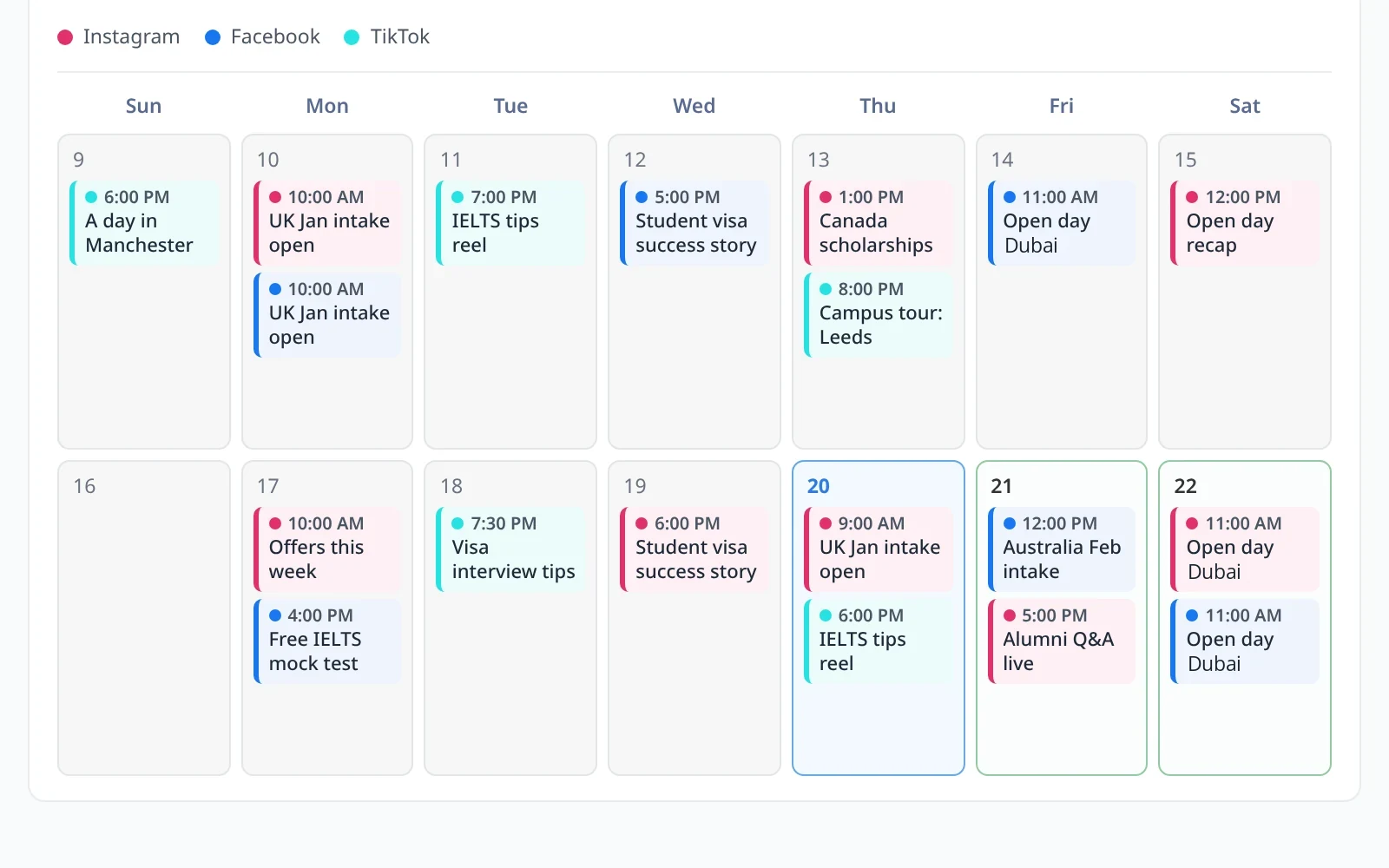
Post to Instagram, Facebook, TikTok from one content calendar. Schedule ahead, colour-coded by platform.

02 · Advertise

Google, Meta, TikTok Ads from one 6-step wizard. Leads land in your CRM tagged with campaign and creative.

03 · Capture

Lead forms across Embedded, Meta, TikTok, Google — field-mapped straight into your CRM.

04 · Segment

Static + Dynamic Lists. Filter by destination, intake, stage, source — audiences update themselves.

05 · Engage

Unified Social Inbox for DMs + comments. WhatsApp broadcast to 1,000 recipients with Meta-approved templates.

06 · Automate

Workflow engine on top of it all. Auto-reply, nurture drips, trigger campaigns on events. No developer.

“Discounts given without my OK, and instalments nobody remembered to invoice.”

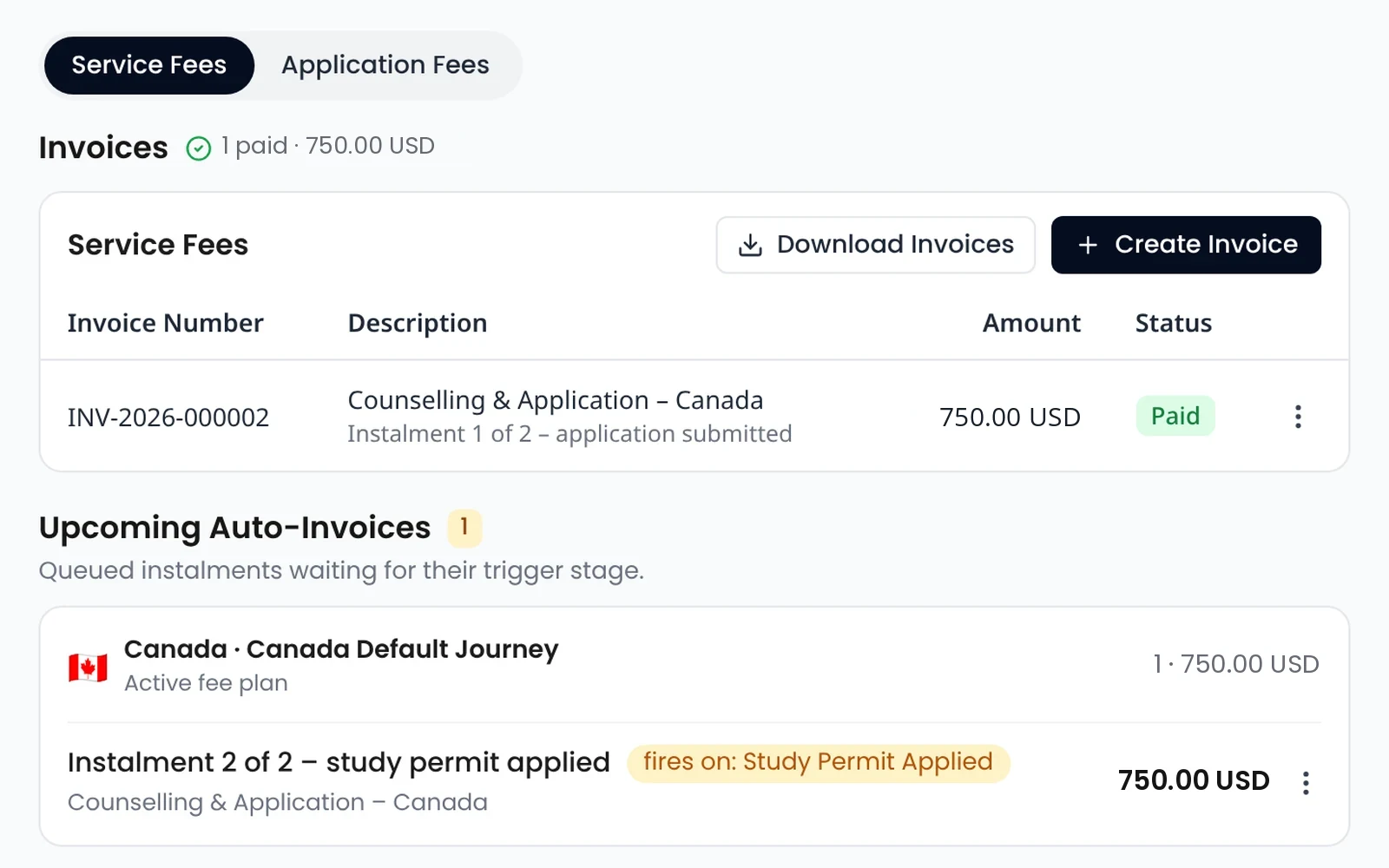
Student Fees

Student fees that bill themselves.

Set up your service catalogue once (counselling, visa support, IELTS prep, SOP writing) with a price per destination. Split each fee into instalments tied to application stages. When an application reaches that stage, the invoice is raised and sent to the student for you.

  • ✓Service catalogue with flat or destination-based pricing
  • ✓Instalment plans tied to application stage, e.g. half at application, half at visa grant
  • ✓Automatic invoices, sent to the student or held as drafts for accounts to review
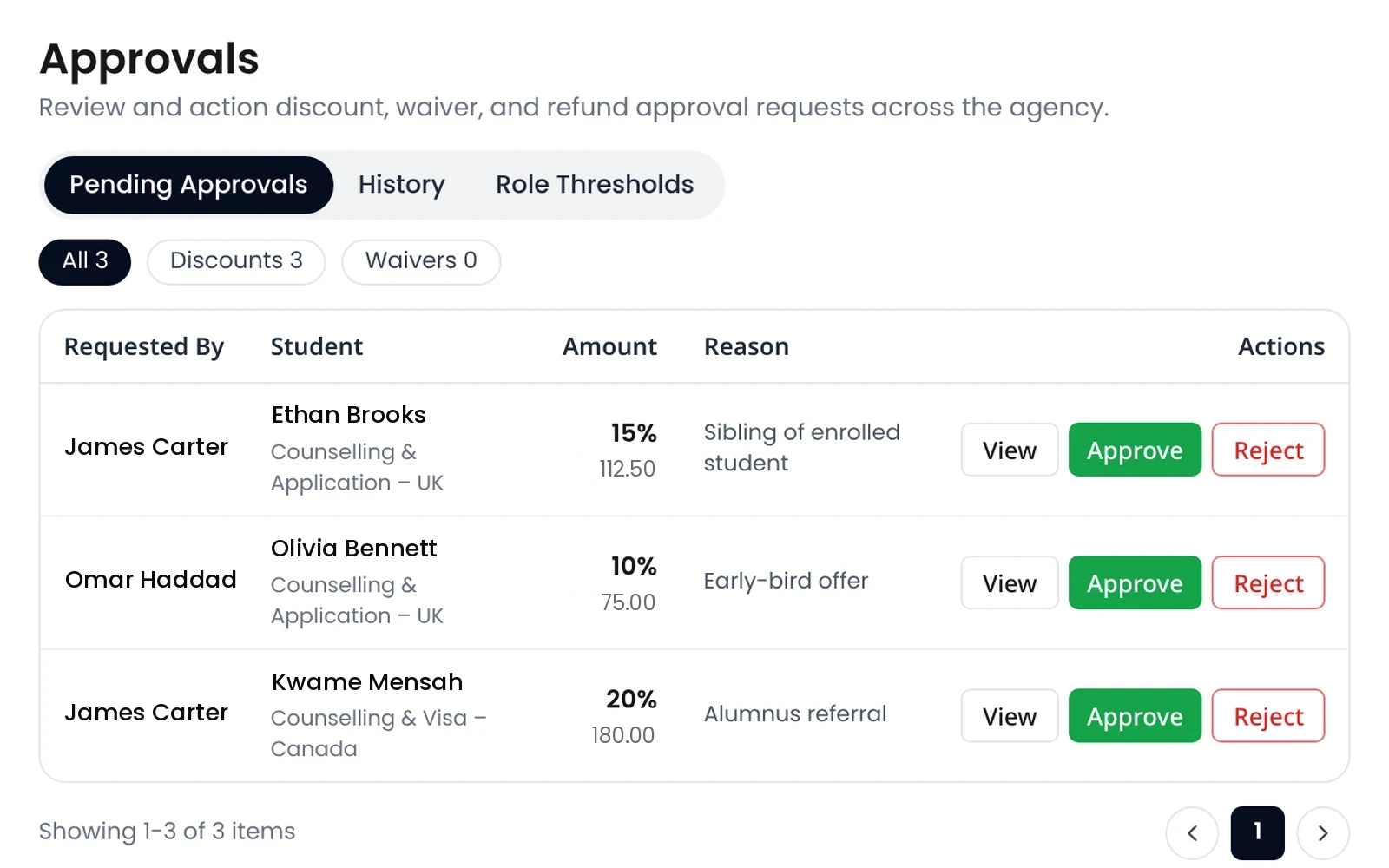
  • ✓Discounts and waivers within each role's limit, with anything bigger sent for approval
  • ✓Refunds with a refund note, kept separate from the payout
  • ✓Zero-fee destinations handled cleanly

Students see their invoices and payment history in the app. Payments are recorded by your team.

Student fees: instalment 1 of 2 invoiced and paid, and instalment 2 queued to fire automatically when the study permit is applied
Three discount requests above the counsellor's limit, waiting for a manager, each with View, Approve and Reject

Stop finding out when it’s too late.

See every module against your own agency setup in a 30-minute demo. No slides. Live product, your data.