Three assistants live inside your CRM. No extra tools to connect, no copying data into a chatbot. They work on your agency’s own data, with the same permissions your team already has.
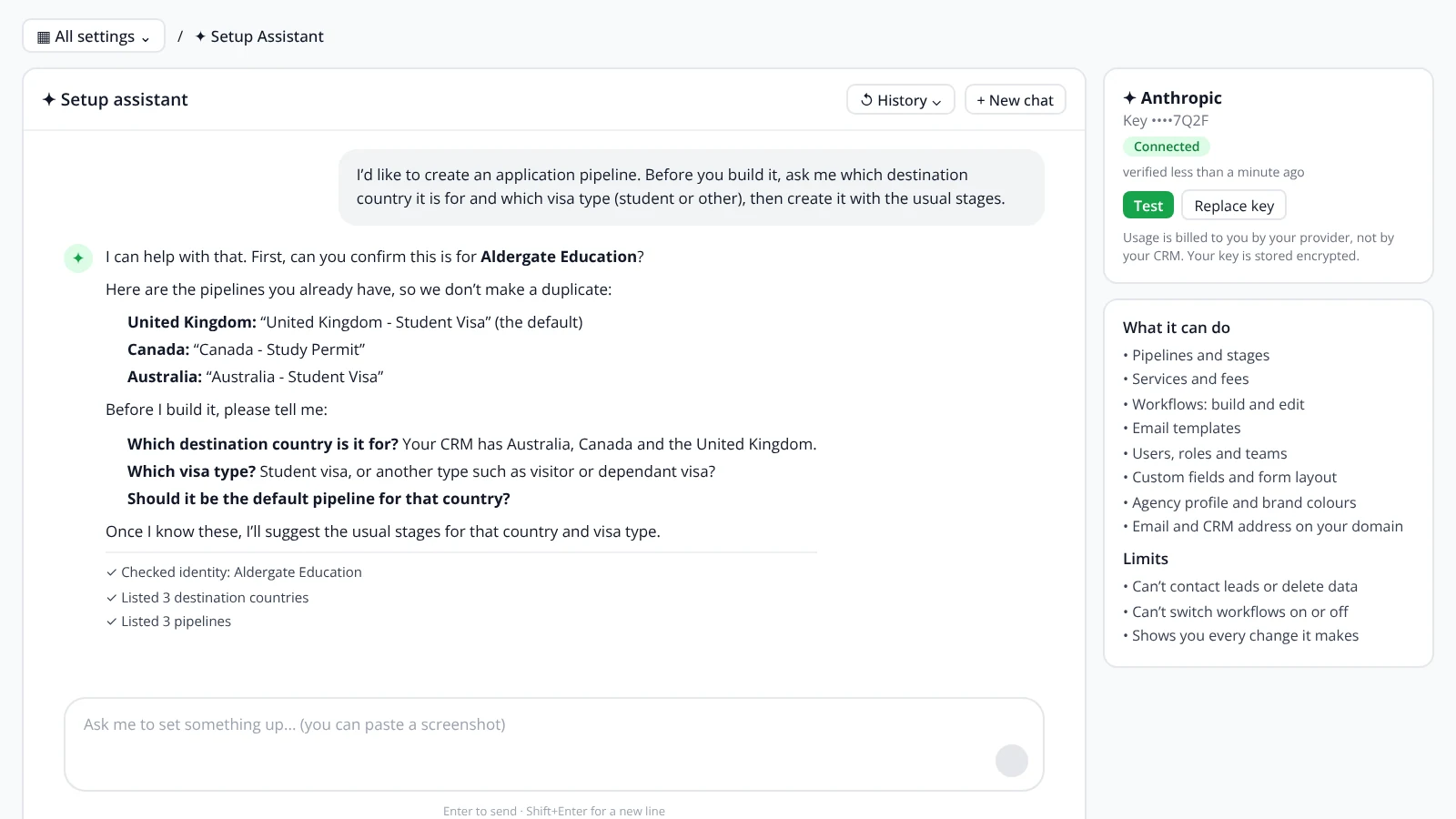
Setup Assistant
“Setting up a new CRM takes months.”
Describe your agency in plain English and it builds your pipelines, fees, workflows, templates and roles.
See how → For your whole teamMy Assistant
“Every report means asking someone to pull numbers.”
Ask “How are my leads doing?” and get the answer in seconds. It only reads, never changes anything.
See how → For counsellorsSOP Writer
“Every SOP takes hours, and copied ones get rejected.”
Writes each student’s Statement of Purpose from their CRM record and research on the course and university.
See how →The Setup Assistant
Most agencies don’t stay on spreadsheets because they love them. They stay because moving to a new system means weeks of setup, consultants and training, while the team still has students to look after. So we took that pain away. You describe your agency in plain English, and your CRM builds itself.
The usual way
Months of setup before the CRM does anything for you.
With your Setup Assistant
Tell it what you need. Watch it build.
Every request below is a job that normally means a manual, a training call or a consultant. Here it’s one message.
“Create a Canada study permit pipeline with the usual stages.”
Pipeline and stages created
“Add IELTS coaching at $250, and counselling at $500 for the UK.”
Services and fees added per destination
“When an offer arrives, email the student and remind them about the deposit after 7 days.”
Workflow built, ready for you to switch on
“Set up our email on our own domain. We use GoDaddy.”
Step-by-step DNS help for your provider
“Add a Branch Manager role and invite our Dubai team.”
Roles, teams and users set up
Shows every change
You see exactly what it created or edited, as it happens.
Workflows stay off
It builds automations, but only you can switch them on.
Never touches students
It can’t contact leads or delete data.
Admins only
Only agency admins can use it, on your own AI key.
“I have to ask someone to pull every report.”
My Assistant
Owners, managers and counsellors ask in plain English, about their own leads and applications. No filters, no exports, no waiting for someone to build a spreadsheet.
How are my leads doing?
✦1,284 leads. 214 are with Elena Rossi, and 9 have no counsellor yet.
Show my application pipeline
✦58 applications: 21 applied, 14 conditional offers, 9 unconditional, 6 at visa stage.
New leads this month
✦186 new leads. The UK leads with 74, then Canada with 41.
Example questions and answers, using demo data.
“Every SOP takes a counsellor hours, and generic ones get the student refused.”
SOP Writer
The SOP Writer reads the student’s record in your CRM, researches the course page and the university’s website, and writes the answers every admissions officer and visa officer looks for. Each one is tied to that student’s own background and plans, not a template.
From the student’s CRM record
Researched for you
The SOP answers
Your counsellor ticks the points this SOP should cover. Each one is written around that student.
✓ Checked for copied passages
Flagged lines are highlighted. Rephrase one, or all of them, in a click.
✓ Your counsellor stays in charge
Edit anything before saving. Every version is kept.
✓ Saved to the student’s documents
As a finished document in one of 10 designs.
Your own AI key
Connect your agency’s Anthropic key once. Your provider bills the usage directly, with no markup from us.
Stored safely
The key is encrypted and never shown again after you save it. Test or replace it any time.
Permissions you control
Each assistant is a role permission. Give it to the people who need it, and nobody else.
No. The assistants are built into your CRM. You connect your agency’s Anthropic key once in Settings, and everything works from inside the CRM.
The assistants use your agency’s own Anthropic key, so your AI provider bills the usage directly. We don’t add a markup. Your key is stored encrypted and never shown again.
It can’t contact leads, delete data or switch workflows on. It builds what you ask for, shows every change, and you switch workflows on yourself. Only admins can use it.
No. My Assistant answers with exactly what that person can already see in the CRM. It only reads and never changes anything.
From the student’s record in your CRM (education, test scores, home country, the course and university they’re applying to, your custom fields) plus research on that course page and the university’s website. Your counsellor chooses which points the SOP covers.
Admins by default. You choose which other roles can use it in your role settings, and it only works on students that person can already open.
Every plan. You decide who can use each assistant in your role settings.
Book a 30-minute demo and watch the Setup Assistant build a pipeline from one sentence.